Before creating playdates, verify that the correct features and showtimes are in the Master Feature and Master Showtime Templates. It is also important to ensure that the correct Admissions Price Profile has been selected.
To create, edit or delete playdates, select "Playdates" from the Manager's Main menu.
It is a good idea to implement an advance ticket policy for your theatres and decide how many days in advance you will put tickets on sale. A good number would be two days or three since often times bookings change on Monday morning and sometimes movies get shelved for weeks, months or indefinately. You can avoid having to refund advance tickets and disappoint your patrons by not selling too far in advance.
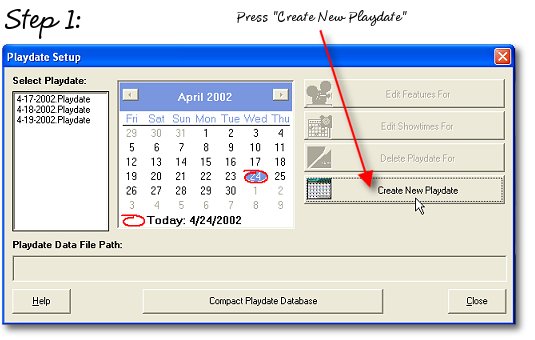
This will create a new database file based on the Master templates.
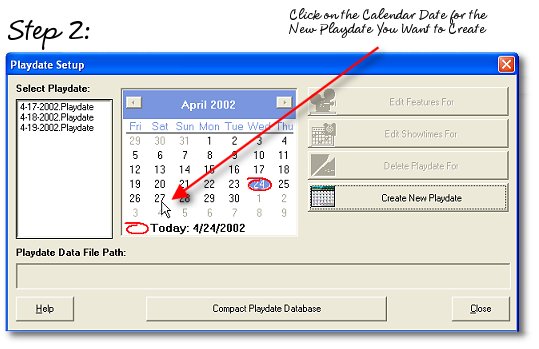
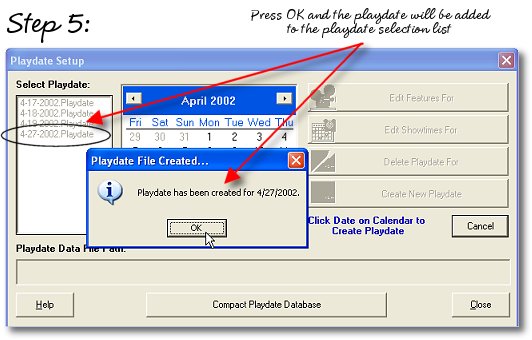
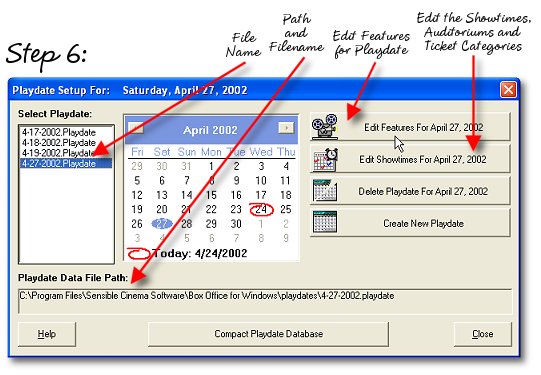
This assigns a playdate to the file and creates the ".playdate" file.
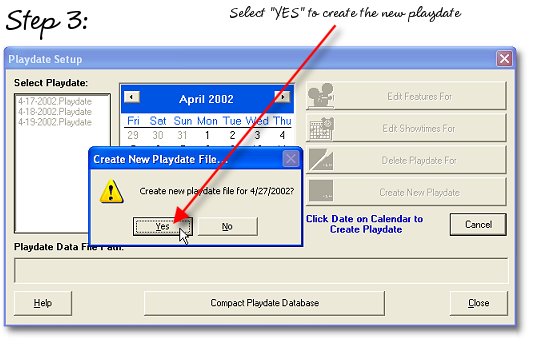
Confirm creation of the new file.
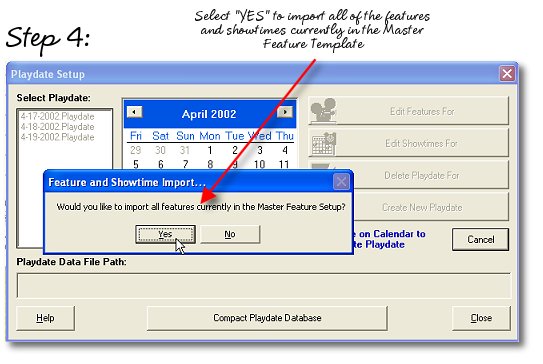
Select "Yes" to bring all of the features and showtimes from the Master Templates into this playdate. Select "No" if you want to manually import features from the template. The "No" option is useful when you want to start selling advance tickets for a particular upcoming movie without knowing what the other movies are going to be for that playdate. Later on you can import additional features from the template to completely configure the playdate.... It's a bit more work manually creating the playdates, but could allow you to sell for weeks prior to a movie's opening date.